Playwright is an excellent tool, and it was built for a job that is almost the opposite of the one an agent has. You write a test for a page you built. You already know the button’s selector, you know what “loaded” means for your app, and you know the cookie banner is there because you put it there. The page holds still while you assert against it.
An agent works pages it has never seen. It does not know the selector, it cannot tell a slow render from a missing element, and the cookie bar is a surprise every time. The friction is different in kind — and the very first form of it shows up before the agent does anything at all: the description of the page it is handed is far too big to read.
The page is mostly furniture
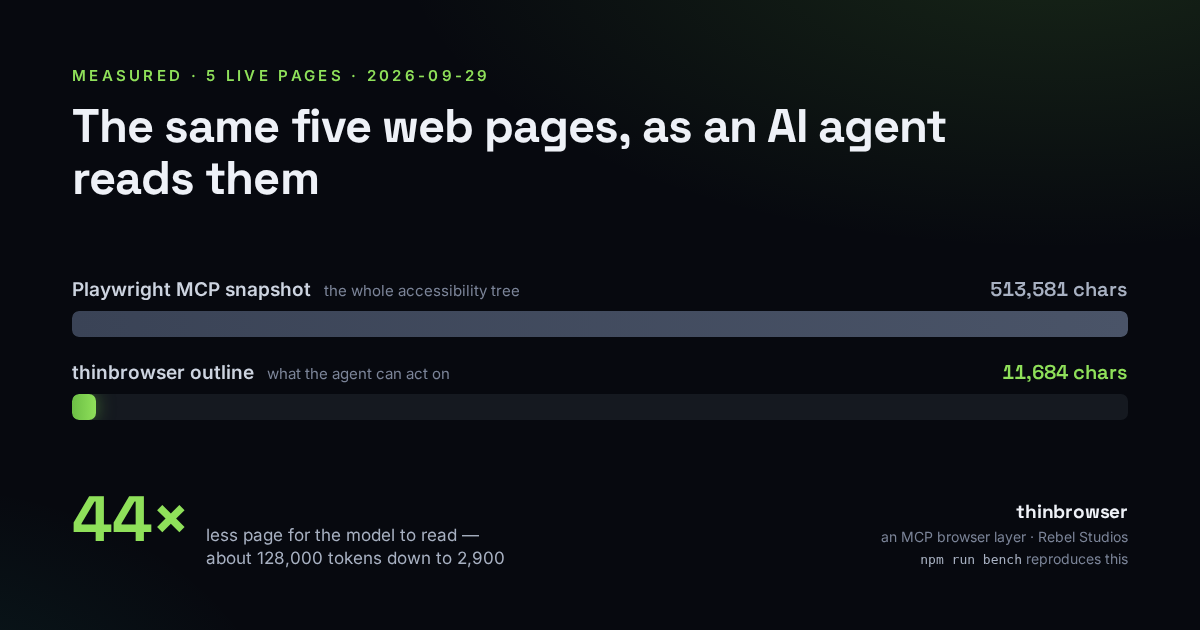
When an MCP-based agent opens a page, it is usually given an accessibility snapshot — a text rendering of everything on the page a screen reader could reach. That is the sensible default, and it is enormous. I measured it against the string Playwright’s own MCP server produces (its internal _snapshotForAI), on five ordinary public pages, on September 29, 2026:
| Page | Playwright MCP | thinbrowser | Smaller |
|---|---|---|---|
| example.com | 1,193 | 464 | 2.6× |
MDN – the fetch API | 167,659 | 2,667 | 62.9× |
| Hacker News front page | 58,101 | 1,771 | 32.8× |
| playwright.dev/docs/intro | 37,296 | 2,905 | 12.8× |
| Wikipedia – “Accessibility” | 249,332 | 3,877 | 64.3× |
| Five pages | 513,581 | 11,684 | 44.0× |
Characters. At the usual rule of thumb of ~4 characters per token, that is about 128,000 tokens versus about 2,900 for the same five pages. The token figure is an estimate, and I am calling it one; the character counts are exact. Run npm run bench in the repo and you will get your own numbers — live pages drift, so the point is the ratio, not the digits.
One Wikipedia article is a quarter of a million characters of snapshot. The agent came to read a definition or click a link in the contents; it was handed every navigation item, every language in the sidebar, every edit affordance, the entire footer, and the ARIA role of each. Almost none of it is the thing it came for. It reads — and pays for — the whole page to use one corner of it.
Cost is the obvious part. Judgment is the quiet part
The token bill is the easy thing to see, and on a multi-step task it compounds: every click returns a fresh snapshot, so a ten-step flow can re-read the furniture ten times. But the more expensive problem is what all that scaffolding does to the model’s decisions. The one control that matters is buried in tens of thousands of tokens of things that do not, and the model has to find it there, every turn, while also holding the task in mind. A smaller, truer description is not just cheaper; it is easier to be right about.
What actually needs to survive
Strip a page to what an agent can act on and it is small: the headings that give it shape, the forms and dialogs as groups, each interactive element as one line — [e12] button “Next” (disabled) — navigation and footer collapsed to a handful of links and a count, then a few hundred characters of the page’s actual text. That is a few thousand characters. The rest of the page has not vanished; it is one call away if the agent needs it. It just does not belong in every turn.
The page fights back in other ways too
Size is the first friction, not the only one. Each of these cost us real time before it got a tool, and each is worth knowing even if you never install a thing:
- The element reference goes stale. You snapshot, you get a handle to the button, the page re-renders, and the handle now points at nothing — or worse, at something else. A reference that lives on the element itself, and survives a re-render, is the difference between “click the thing I just saw” and “click whatever is at that index now.”
- A cookie bar eats the click. The agent targets the right button; an overlay it cannot see is on top of it; the click lands on the overlay. A click that first checks what is actually on top of the target, and says so, fails loudly instead of doing the wrong thing quietly.
- “Not found” and “not loaded yet” look identical. The most dangerous ambiguity in browser automation: an element that is genuinely absent and one that has simply not arrived produce the same empty result, and an agent will confidently conclude the wrong one. The honest answer distinguishes there, still loading, and absent on a page that has gone idle.
- Two things share a name and the tool picks one in silence. There are two “Submit” buttons; the click takes the first and says nothing. That silence is how a click meant for a wizard’s submit reopens a sidebar instead. A tool that acts on the first but tells you it had a choice turns a mystery into a one-line fix.
Closing the gap
Those frictions are why we built thinbrowser, an MCP browser layer over Playwright — Playwright still does the hard part of actually driving Chromium. Every tool in it exists because one of the problems above cost us an afternoon. The snapshot returns the compact outline, not the accessibility dump — the 44× in the table above. References live on the element, so a button keeps its handle across snapshots for as long as it exists. click scrolls to the target, moves or dismisses whatever overlay is covering it, and reports what it did. wait answers one of those three states instead of a bare true/false. And when a page is a login wall or a bot check, the snapshot says so at the top rather than coming back as a page that looks mysteriously empty.
It reports the wall; it does not climb over it
A tool this useful for automation is easy to point in a bad direction, so it is worth being plain about the limits. thinbrowser names a Cloudflare interstitial or a login page; it does not try to defeat one. Its solve step reopens the challenge in a visible window for the human who is already sitting there to clear. And secrets go through a fill_secret tool that reads a value from a credentials file straight into the field — the value never passes through the model’s transcript, and later snapshots show the field as (secret). Doing the least, storing the least, and saying what it cannot do is the whole posture.
It is free and MIT-licensed, it is not tied to one model or editor, and it installs as one line: claude mcp add thinbrowser -- npx -y thinbrowser, or point any MCP client at npx -y thinbrowser as a stdio server. The benchmark is in the repo; the fastest way to disbelieve the 44× is to run it yourself.
We build tools that treat your agent’s context — and your data — as something scarce, worth spending carefully. That’s what we do at Rebel Studios.