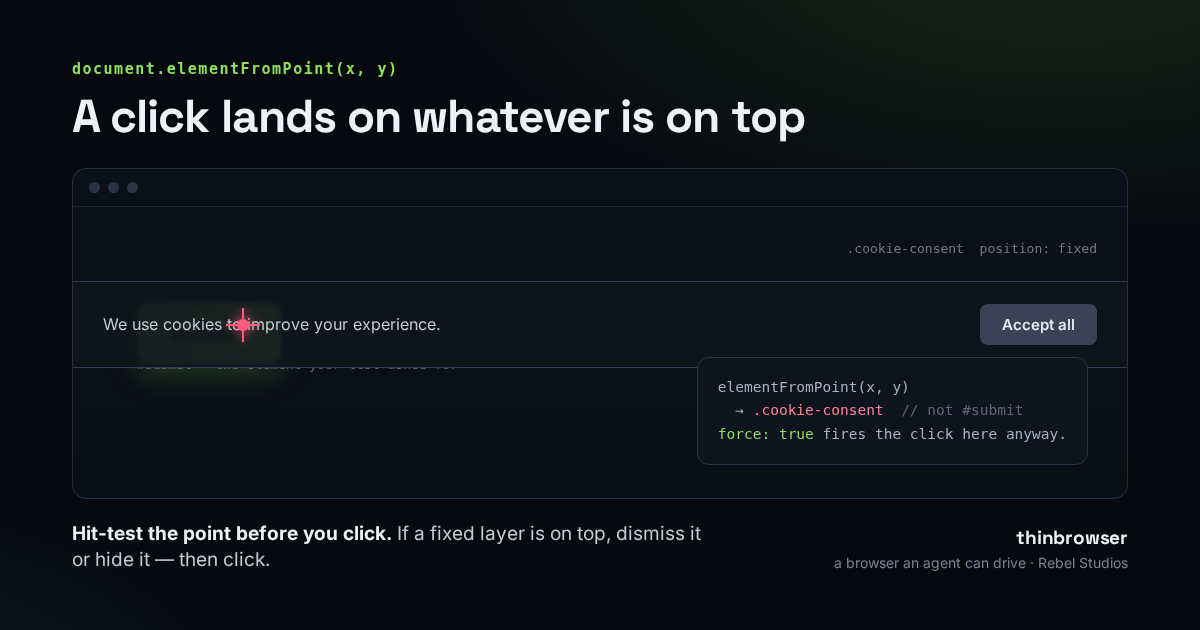
You have all met this bug. A test clicks a button, the button does not react, and the failure surfaces three steps later somewhere that has nothing to do with the real cause. Or the louder version, where Playwright refuses outright:
Error: locator.click: Timeout 30000ms exceeded.
<button id="submit"> intercepts pointer events
  <div class="cookie-consent"> from <body> subtree
  ...retrying click action
Both are the same problem wearing two faces. Something is sitting on top of the element you asked for, and when a click lands at that spot on the screen, the thing on top receives it. A cookie consent bar is the classic culprit; so is a sticky header, a chat bubble in the corner, a newsletter modal, or a loading spinner that has not torn itself down yet.
Why it happens at all
A click in a browser is delivered by coordinate, not by intent. Playwright takes your target, finds the centre of its bounding box, and dispatches a click at that pixel. The browser then hands the event to whatever element is topmost at that pixel. If a fixed or sticky element overlaps the centre of your button, that element is topmost, and it gets the click. This is not a Playwright quirk — it is exactly what would happen to a real cursor. Playwright is being faithful to the page; the page is just in a state you did not account for.
The reason it is so easy to miss is that the overlay is usually invisible to you. It appears on a cold load, or only in the CI viewport size, or only when a cookie has not been set yet — which, in a fresh automation profile, is every single run.
The fix that makes it worse: force: true
The first thing everyone reaches for is { force: true }, because it makes the error go away. It does that by skipping the checks that noticed the problem. The overlay is still there, still on top, and still the element under the cursor — so it still receives the click. Force does not move anything out of the way; it tells Playwright to stop objecting and fire the click into whatever happens to be there. You have silenced the warning and kept the bug, which is worse than the loud version, because now it fails silently.
The other brittle patches are cousins of the same mistake. A blind waitForTimeout(2000) hopes the banner animates away before you click, and it does — until the day CI is slow. Hardcoding “click the Accept button first” works right up until the next site, or a redesign that renames the button. Each of these fixes one page. The bug is general, so the fix should be too.
Ask the DOM what is actually there
Rather than guessing, ask the page the one question that matters: at the exact point I am about to click, what element will receive it? The browser will tell you, through document.elementFromPoint.
const box = await locator.boundingBox();
const x = box.x + box.width / 2;
const y = box.y + box.height / 2;

const onTop = await page.evaluate(([x, y]) => {
  const el = document.elementFromPoint(x, y);
  return el && el.className;      // -> "cookie-consent"  (not your button)
}, [x, y]);
If the element under the point is your target — or an ancestor or descendant of it, which still counts as a hit — the path is clear and you can click. If it is something else, you have found your overlay, and now you can deal with it deliberately instead of by timeout. Walk up from the hit element to the nearest ancestor whose position is fixed or sticky: that is the layer doing the covering, not the little inner <span> the point happened to touch.
Dismiss it — do not just hide it
Once you have the overlay, there are two ways to clear it, and the order matters. Reach first for the button a real person would press: scan the layer for an accept, agree, got it, close, dismiss, or reject control and click that.
Hiding a cookie bar leaves the page in a state no real user ever sees
Setting visibility: hidden on a consent bar makes it stop intercepting clicks, but the consent event never fires, the scroll lock it applied may stay on, and any script waiting for “user accepted” waits forever. Pressing the bar's own Accept or Reject puts the page into a real state — the one your users are in. Keep hiding as the fallback for overlays that genuinely have no dismiss control, and re-check afterwards, because clearing one layer often reveals another underneath it.
Only after the path is clear do you click. And if the normal click still fails for some reason you did not anticipate, there is one last resort worth knowing:
await locator.evaluate(el => el.click());Calling .click() on the node dispatches the event straight to the element, so no overlay can intercept it — you are not going through screen coordinates at all. The catch is that it skips the real pointer sequence: no hover, no mousedown, no focus change. A handler bound to those will not fire, and a button that only reacts to a genuine pointer event will look like it did nothing. So it belongs at the end of the chain, after you have tried to clear the path honestly, not at the front as a shortcut.
We run this before every click
This is not a hypothetical for us. We build thinbrowser, a browser an AI agent drives through MCP, and an agent hits this constantly: it cannot glance at the page and notice a banner the way you would, so a click that lands on a cookie bar is a whole wasted step it may not even realise it wasted. So thinbrowser runs exactly the routine above before every click — hit-test the centre point, find the fixed or sticky layer on top, press its dismiss button or, failing that, hide it, up to three rounds because overlays stack — and only then clicks, with the DOM-click fallback if the normal click still will not land. Every action reports what it moved out of the way (“pressed Accept all on an overlay”), so a run that had to clear a banner says so, instead of hiding it.
If you drive a browser with an agent, it is one line to try:
claude mcp add thinbrowser -- npx -y thinbrowserWe build the unglamorous reliability so the interesting part works. That’s what we do at Rebel Studios.