● VS Code extension · live on the Marketplace
Dev Toolbox for VS Code
Fifteen everyday developer transforms, right on your editor selection. Open the Command Palette, type Dev Toolbox, and convert. No copy-pasting into web tools.
Fifteen everyday developer transforms, right on your editor selection. Open the Command Palette, type Dev Toolbox, and convert. No copy-pasting into web tools.
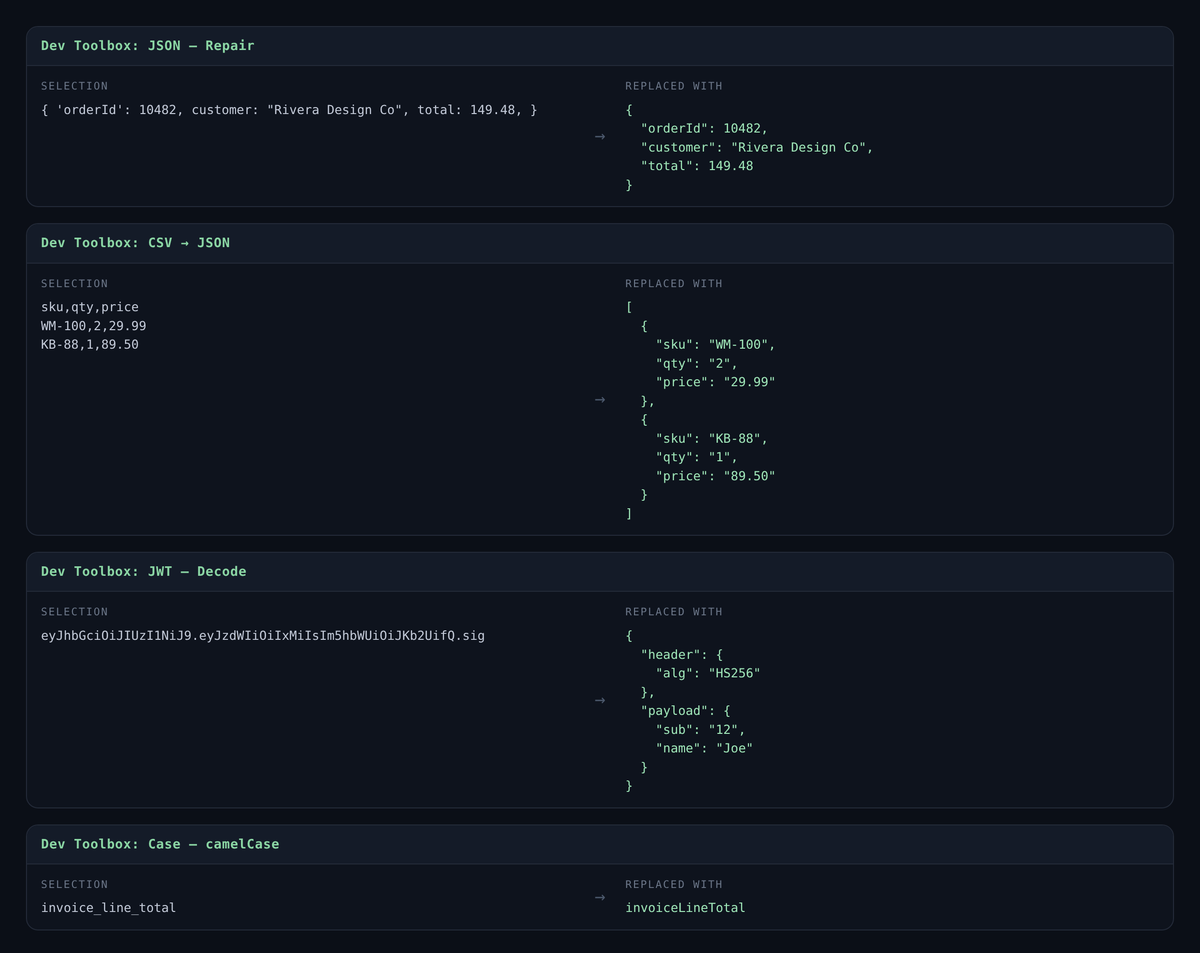
Format, minify, and repair broken JSON (smart quotes, trailing commas, unquoted keys) in place.
CSV ↔ JSON, JWT decode, Base64 encode/decode, URL encode/decode, on the selected text.
Sort lines, remove duplicates, and convert to camelCase / snake_case / kebab-case.
Everything runs in the editor. No network, no telemetry, no accounts.
Every one of these operates on your current selection and replaces it in place. Nothing leaves the editor.
"Smith, Jr." survives the round trip instead of splitting into two columns.Every one of these transforms already exists as a website, and that is precisely the problem. The web version costs you a context switch, a paste out, a paste back, and a moment of not thinking about the thing you were actually doing.
The more serious cost is what you paste. A JWT from your staging environment is a live credential. A config blob is often full of internal hostnames, bucket names and account identifiers. A CSV pulled from production may be customer data. Pasting any of that into a free web utility means handing it to a server you know nothing about, run by someone with no obligation to you. And the habit is hard to break once it is a habit, because the tool that is one tab away is the tool you use at 5pm on a Friday.
Running the transform locally removes the decision entirely. There is no network call to audit, no retention policy to read, and no difference in behaviour between the token you were allowed to paste and the one you were not.
Select the text. Open the Command Palette (Ctrl+Shift+P, or Cmd+Shift+P on a Mac) and type Dev Toolbox. Pick the transform. The selection is replaced.
Because the commands live in the palette, the ones you reach for most surface first as VS Code learns your habits, and you can bind any of them to a keystroke through the normal keyboard shortcuts editor if a particular transform becomes muscle memory.
It does not lint, validate against a schema, or tell you whether your JSON is correct, only whether it parses, and how to make it parse. It does not verify a JWT’s signature; decoding is not verification, and any tool implying otherwise is teaching a dangerous habit. It has no accounts, no settings to sync, no telemetry, and it makes no network requests at all.
VS Code does not sandbox extensions, so that last part is a promise, and you can check it rather than trust it. The whole extension is two short JavaScript files in its install folder, extension.js and lib/transforms.js, and neither one loads a network module.
Four of the fifteen, run on a real selection. The output below was produced by the extension’s own transform code, not typed out by hand.
All fifteen transforms, no account and no network requests. Install it, select some text and open the Command Palette.
Install from the Marketplace →