It is the end of the day and forty orders came in. You open the first order, click to print its invoice, wait for the PDF, hand it to the printer, go back to the Orders list, open the second order, and do it again. Forty orders is forty order screens and forty print dialogs. Nothing about it is hard. It is just half an hour of clicking that you do every single day, and it scales linearly with how well the shop is doing — the busier you get, the more of your evening it eats.
The strange part is that WooCommerce will not do this for you, even after you have added an invoice plugin. You can bulk-change an order status, bulk-move orders to the trash, bulk-mark them complete. You cannot bulk-print their documents. Here is why, and what it actually takes to close the gap.
Why there is no “print all” button
Two things stack up here. First, core WooCommerce does not produce an invoice at all — no PDF, no packing slip, nothing you would hand a customer or a courier. That is deliberate; invoicing rules differ by country and WooCommerce leaves it to plugins. So the document itself already comes from an add-on.
Second, the plugins that add per-order documents mostly stop at per-order. They give each order a tidy PDF and a print button on the order screen, which is the right first feature. But the Orders list — the one screen where you can see a whole day at a glance and tick a batch — keeps only WooCommerce's own bulk actions. Printing is not one of them. So you get a good invoice, one order at a time, and the tedium is left as an exercise for the shop owner.
What “print them all” actually requires
Batch printing sounds like a loop around the single-print code, and if you build it that way you get forty separate PDFs downloading at once, which is worse than what you started with. A bulk action that a fulfilment person would actually thank you for has to get four quieter things right.
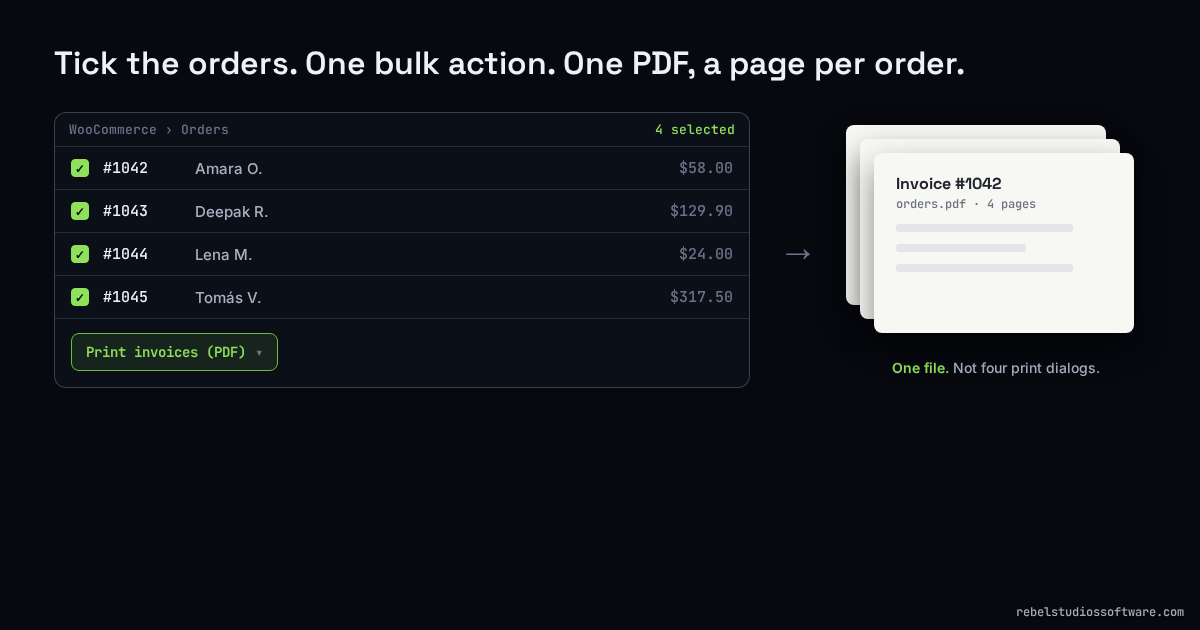
One file, with a page break per order. The output is a single PDF where order #1042 ends and #1043 starts on a fresh page. That is what makes it printable in one go: you send one document to the printer and the page breaks fall where the orders do. Concatenating the HTML and inserting a hard page break between each invoice is the whole trick, but it is the trick that has to be there.
It has to render on the server, and know its own limits. Building the PDF happens in one request, so its memory and time grow with the number of orders in the batch. For a normal day that is nothing. For someone selecting eight hundred orders at once it is a request that can time out, and the honest design tells you to print in groups rather than pretending an unbounded batch is fine. A convenience feature that falls over on a big day is not a convenience feature.
It has to hook both order screens. This is the one that quietly breaks half of installs. WooCommerce is mid-migration from the classic post-based orders table to HPOS (High-Performance Order Storage), and the two screens fire different bulk-action hooks:
// Classic Orders screen (posts table)
add_filter( 'bulk_actions-edit-shop_order', $register );
add_filter( 'handle_bulk_actions-edit-shop_order', $run, 10, 3 );

// HPOS Orders screen (custom orders table)
add_filter( 'bulk_actions-woocommerce_page_wc-orders', $register );
add_filter( 'handle_bulk_actions-woocommerce_page_wc-orders', $run, 10, 3 );
Register on only one and the action simply will not appear for stores on the other — with no error, because from the code's point of view nothing went wrong. Anything you add to the Orders list in 2026 has to cover both until the migration is done.
The batch has to look exactly like the single. If the bulk PDF uses a different template or a different renderer, you have two invoice designs to keep in sync and a customer who occasionally gets the odd-looking one. The bulk output should reuse the same renderer, the same branding settings and the same paper size as the one-at-a-time print, so a bulk-printed invoice is byte-for-byte the document you would have printed by hand.
The graceful-degradation detail
Server-side PDF generation needs a PDF engine, and not every budget host ships one. The failure people accept is a fatal error and a white screen; the failure worth engineering is a fallback to a clean, printable HTML page — the browser's own print dialog still gives you paper. It is the same principle as the batch-size limit: the feature degrades to something usable instead of to nothing. You want the person who is having a bad hosting day to still get their invoices out the door.
How we packaged it
We split this across a free plugin and a paid add-on, along the line where the work changes.
The free Rebel Studios Invoice Documents for WooCommerce gives every order a clean PDF invoice, packing slip and delivery note, generated on your own server, attached to the right order email automatically, and printable in one click from the order screen. It works on classic and block checkout and on HPOS, and if the host has no PDF engine it falls back to a printable page. For a shop doing a handful of orders a day, that is the whole job.
The paid Invoice Documents Pro adds the part that only matters once you have volume: two bulk actions on the Orders list, Print invoices (PDF) and Print packing slips (PDF). Tick any number of orders, choose the action, and you get one PDF with a page per order, styled identically to the ones you print singly, on both order screens. It needs the free plugin active, and it is a one-time purchase with a licence key — on Gumroad. If you would rather build the bulk action yourself, the four points above are the parts that actually decide whether it works.
The short version
WooCommerce hands you per-order invoices and stops there, so printing a day's worth is a manual loop that grows with your sales. Closing it is not exotic: one PDF with a page break per order, rendered server-side with an honest batch limit, hooked into both the classic and HPOS order screens, using the exact same renderer as the single print, and degrading to a printable page when the host has no PDF engine. Get those right and end-of-day printing becomes one tick, one click, one file.
We build and run small products, and write up what breaks. Invoice Documents (free) · Pro · Rebel Studios.