Open your editor and count the browser tabs you keep around for one job each: a JSON formatter, a JWT decoder, a Base64 converter, that CSV-to-JSON site whose name you can never remember. Most developers have a small collection of them, reopened out of habit whenever a blob of text needs reshaping. Each visit takes about ten seconds. That is exactly the problem: it is small enough that you never stop to question it.
There are two costs to the detour, and the second one is the one people miss.
The first cost is your attention
You almost never reshape text on its own. You do it in the middle of something else: a failing test, a log you are reading, a payload you are about to drop into a request. Leaving the editor to format that text is a context switch out and another one back, and the thing you were actually doing has to be reloaded into your head each time you return. No single trip feels expensive. A dozen of them a day is a tax you pay without noticing.
The second cost is the data you paste
The text you are reshaping is often not yours to share. A JWT lifted out of a request is frequently a live session. A JSON body pulled from an API can carry a customer email, an internal ID, a home address. A CSV export is, by its nature, a list of real rows about real people. Paste any of that into an unknown web tool and you have handed a stranger’s server a copy, with no way to know whether it is logged, retained, or sold on. Most of those sites are perfectly honest. “Most” is a poor word to attach to a credential or a customer record.
The fix is not “find a decoder you trust”
You cannot audit a website’s retention policy from the outside, and its behaviour can change between the visit you trusted and the next one. The durable fix is to run the transform where the text already is, on your own machine, so there is no server in the loop to trust at all.
The free ways, task by task
Several of these you can already do without installing anything, and they are worth knowing:
- Format or minify JSON. VS Code formats a JSON document with
Shift+Alt+F(Shift+Option+Fon macOS), no extension required — as long as the JSON already parses. - Decode a JWT. The payload is just Base64url. In the integrated terminal:
node -e "console.log(atob(process.argv[1].split('.')[1].replace(/-/g,'+').replace(/_/g,'/')))" <token>, or the browser-console one-liner from our JWT post. - Base64.
base64to encode andbase64 --decode(-Don macOS) to decode are already installed on macOS and Linux.
The catch is that they are scattered: a keybinding for one, a terminal flag for another, a one-liner you reconstruct from memory for a third. And some of the most common jobs have no clean built-in at all. VS Code will not format JSON that does not parse yet — which is precisely the JSON you need help with, the one with a trailing comma, a single quote, or a missing brace. There is no first-party CSV to JSON, no decode this JWT and turn the timestamps into dates, no remove the duplicate lines from this list.
Closing the gap without opening a tab
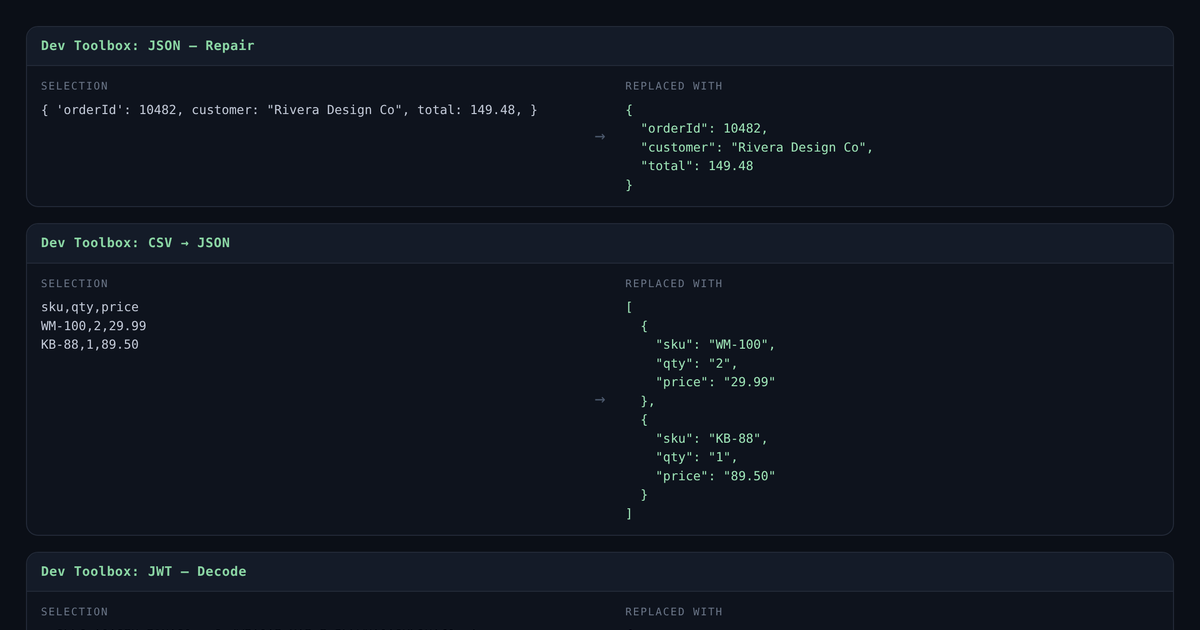
That scatter is why we built Dev Toolbox, a VS Code extension that puts fifteen of these transforms on your current selection, run from the Command Palette. Select the text, pick the transform, and it is replaced in place: JSON format, minify, and repair (it fixes the trailing commas and single quotes that stop JSON from parsing); CSV to JSON and back; JWT decode with the exp and iat timestamps rendered as real dates; Base64 and URL encode and decode; sort lines and remove duplicates; and case conversion between camelCase, snake_case and kebab-case.
It is deliberately narrow about what it does not do. It does not lint your JSON or check it against a schema; it tells you whether it parses, not whether it is correct. It does not verify a JWT’s signature, because decoding is not verifying, and a tool that blurred the two would be teaching a dangerous habit. It has no accounts, nothing to sync, and no telemetry.
It asks for no network permission at all
An extension that requests no network access makes a stronger promise than any privacy policy can. A tool that cannot reach the internet cannot leak your selection, whatever its intentions or its next update. That is the whole point of moving the transform off the web and into the editor: the trust question stops being “do I believe this site?” and becomes “can this code even make a network call?” — and the answer is no.
It is free on the VS Code Marketplace. Install it, select some text, and open the Command Palette; every transform is prefixed Dev Toolbox:, so they group together. Then you can close the tabs.
We build software that treats your data as yours. That’s what we do at Rebel Studios.