You tell the browser to open a page, or you click a button and the page reacts. Then comes the question every piece of browser automation has to answer, and most answer badly: is it safe to read yet? Act too early and you scrape a half-built DOM, or click a control that is a frame away from moving. Wait too long and you have bolted dead time onto every step of a run that might have thousands.
The fixed pause is wrong in both directions
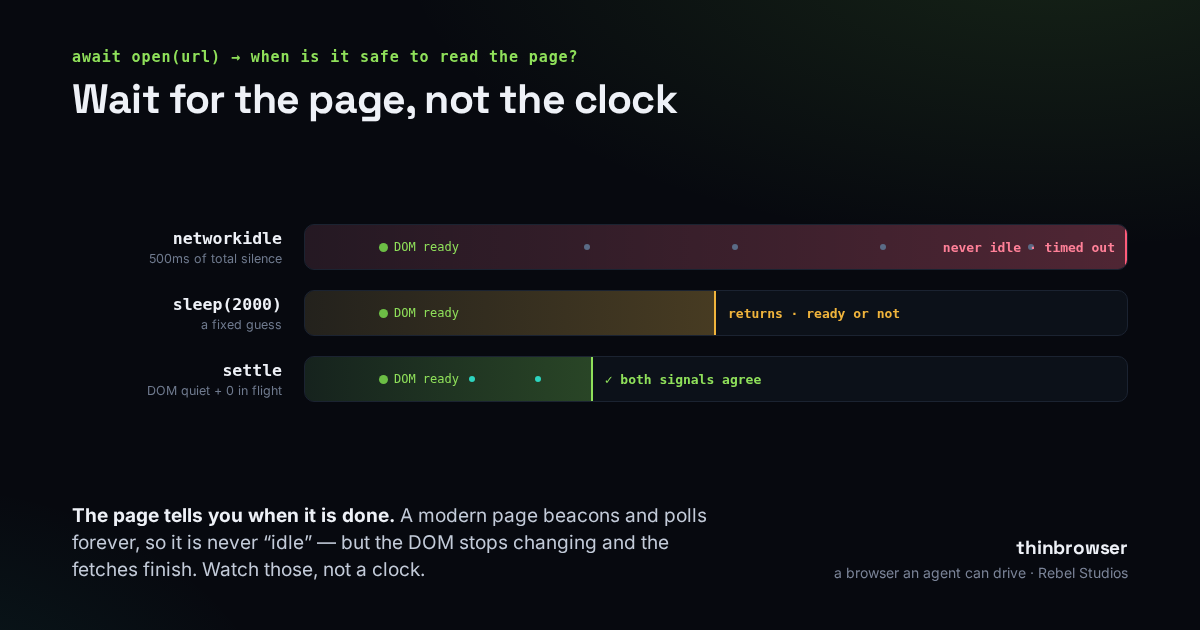
The first thing everyone reaches for is a fixed wait — await sleep(2000) after each action — and it is wrong in both directions at once. Two seconds is too short for the page still fetching on a slow connection, so you get a race that fails one run in twenty and is miserable to reproduce. And it is far too long for the page that was ready in 150 milliseconds, which is most of them; you pay that tax on every action, and it compounds over a long flow. A fixed wait also tells you nothing when it is over: if the read comes back empty, you cannot say whether the element is missing or merely late.
networkidle sounds principled and never happens
Playwright offers what looks like the grown-up answer: wait until the network goes quiet. waitForLoadState('networkidle') returns once there have been 500 milliseconds with no requests in flight. On a page you built for a test suite, that is often fine. On a page in the wild it is a trap, because a modern page never goes quiet. It polls an endpoint for notifications. It beacons analytics on a timer. It holds a websocket open and pings it. There is always something in flight, so the 500 milliseconds of total silence never arrive — and the call sits there until it hits your timeout, on every single navigation.
We measured this on September 24, 2026. One of our own dashboards finished its DOM in 116 milliseconds and then waited out the full four-second ceiling we had given networkidle, for a silence that was never coming — a 34× tax on a page that had been usable in a tenth of a second. docs.stripe.com did the same thing. Of four ordinary pages, two timed out outright; the two that did return still paid between 500 milliseconds and 1.5 seconds, because 500 milliseconds of enforced silence is networkidle's floor by definition. Its best case is still slower than the page deserved.
Ask the two questions that actually decide it
So stop waiting for the network to fall silent, and ask instead the two questions that genuinely decide whether a page can be driven: has the DOM stopped changing, and is anything still in flight? Both signals are cheap to keep. A MutationObserver in the page's init script stamps a timestamp every time the DOM mutates. The request hooks already record when a request starts and when the last one finishes. When both have been still for about 200 milliseconds, the page has settled — return right then. There is no clock to wait out; you leave the moment the page is ready and not a tick later.
Timestamps, not counters
Track when the last mutation and the last request happened, not how many requests are open. A counter of in-flight requests can wedge: miss one completion — a cancelled fetch, an aborted preload — and it never returns to zero, so the wait never ends. A timestamp cannot get stuck. And it handles the awkward case a counter cannot: a page with a one-second heartbeat settles in the gaps between beats, instead of being declared busy forever.
The trap: returning an empty shell
There is one trap here, and it is a good one, because the naive version of “wait until the DOM is quiet” fails by returning too early. Straight after first paint there is a window where the DOM is quiet and nothing has been requested — not because the page is done, but because the page's own script has not fired its fetches yet. Exit there and you hand back a shell. The dashboard this code was written for came back reading Scanning ~ … with every data card still empty, and the automation cheerfully reported success.
The first fix was a flat floor: never return inside the first 400 milliseconds. It worked — and then it turned out to be the thing we were waiting on. Measured on September 25, 2026, the wait was exiting at 426–430 milliseconds on three of four real pages: the floor plus a single poll tick, while the pages themselves had been ready earlier. We had swapped one fixed wait for another and called it progress.
The fix that held opens the gate on a signal instead of a clock. The moment the page has issued a request of its own since navigation, its script is demonstrably running, and the quiet checks can be trusted from then on. A page that genuinely fetches nothing gets a short backstop — 150 milliseconds — and no more. The wait is now bounded by what the page does, not by a number we guessed.
The rule: change the waiting, not the answer
A change to timing has to change how long you wait and not what you get back, and the only way to know that is to measure the thing you get back — not to re-run it and squint. So we did: identical snapshots on five live pages, before and after. On the dashboard the wait dropped from 2,370 to 1,400 milliseconds, and — the part that mattered more — it got more consistent. The old floor had returned 2,578, then 2,603, then 2,605 characters on successive runs; it had been catching the page mid-render. The signal-based version returns the same 2,605 every time. Faster was welcome. Deterministic was the point.
Where it stops
None of this is magic, and it is worth being plain about the edges. This settle is a heuristic with a ceiling — two seconds by default, three for the heavier actions — and a page that truly never stops, an infinite feed or a canvas repainting every frame, will hit that ceiling and return anyway. That is deliberate: at its worst it degrades to a bounded wait, never longer than the fixed sleep it replaced. A page whose script fires no requests at all gives you only the DOM-quiet check and the 150-millisecond backstop to lean on. Knowing that failure mode is the whole point — a wait that lies about being ready is worse than one that is honestly a little slow.
This is how thinbrowser, our MCP browser layer over Playwright, decides a page is ready: every open and every click waits on those two signals before it returns, so the snapshot you get back is of a page that has stopped moving rather than one caught halfway through a render. Playwright still does the hard part of driving Chromium; this is the thin layer of judgment on top that a page you have never seen turns out to need.
It is free and MIT-licensed, tied to no single model or editor, and it installs as one line: claude mcp add thinbrowser -- npx -y thinbrowser, or point any MCP client at npx -y thinbrowser as a stdio server. The settle is a couple of dozen lines in the open; the comments in it are the measurements above.
We build tools that treat your agent's time — and yours — as something worth not wasting. That's what we do at Rebel Studios.