You move your best posts behind a membership, and for a few weeks nothing looks wrong. Then the search traffic to those pages thins out, and keeps thinning, and by the time you notice, the articles that used to bring in new members bring in almost nobody. The fence did not only keep out freeloaders. It kept out Google, and Google stopped sending you the people who would have paid to get in.
This is avoidable, and the correct fix is not the one most people reach for first. There are two ways it goes wrong, and the second is far more expensive than the first.
The page Google sees is the fence
When a restriction plugin gates a post, the naive behaviour is to replace the body with a “this is for members” notice, or worse, to redirect anyone who is not logged in to a login form. Googlebot is not a member and carries no session, so the version Google crawls, indexes and ranks is the notice or the login page — a URL with no real content on it. Over a few weeks Google concludes the page no longer answers the query it used to rank for, and the position goes with it. The redirect case is the worst of the two: now Google has a login form indexed under a URL that used to be an article, and login forms rank for nothing.
You can confirm this is what happened rather than guess at it. Fetch the page the way an anonymous crawler does — no cookies, no session — and read what actually comes back:
# what an anonymous crawler gets: no cookies, no login
curl -s https://example.com/members/deep-guide | grep -i "members only"
If that prints your gate notice, that notice is what Google has in its index, and no amount of keyword tuning on a page Google cannot read will move it.
The fix that earns a penalty
The obvious repair is to detect when the visitor is Googlebot and hand it the full article while everyone else gets the fence. Do not do this. Serving search engines content that differs from what humans see is cloaking, and it is one of the few SEO mistakes Google treats as deliberate deception rather than an honest technical fault. The cost is not a slipped ranking on one page; it can be a manual action against the whole domain, and those are slow and painful to lift.
The instinct underneath it is correct — Google should be allowed to see the content — but user-agent sniffing is the wrong mechanism, and there is a supported one that reaches the same result without the risk.
What Google actually asks for
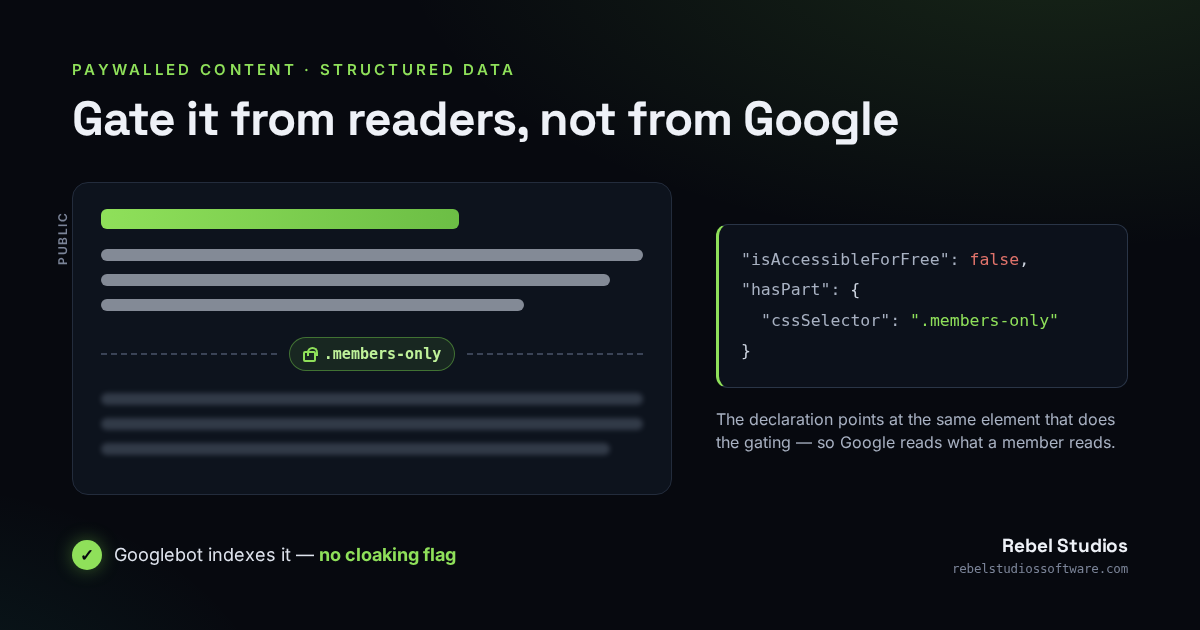
Google has a documented model for exactly this situation, which it calls subscription and paywalled content. You keep gating the article from humans, you let the crawler read it, and you stay clear of the cloaking penalty by declaring that the difference is intentional. The declaration is a small piece of structured data in the page head:
<script type="application/ld+json">
{
  "@context": "https://schema.org",
  "@type": "Article",
  "headline": "Cold-Weather Beekeeping: The Complete Guide",
  "isAccessibleForFree": false,
  "hasPart": {
    "@type": "WebPageElement",
    "isAccessibleForFree": false,
    "cssSelector": ".members-only"
  }
}
</script>
Two flags carry the whole thing. isAccessibleForFree: false on the article says the page is not entirely free. The hasPart block names the gated part, by pointing a CSS selector at the element that wraps it. With that in place, Googlebot may read the fenced content and treats the gap between what it sees and what a logged-out human sees as declared, not as cloaking. If more than one section is gated, hasPart also accepts an array of these blocks.
The selector is where it silently breaks
The most common way this fails leaves no error anywhere: the cssSelector points at an element that is not on the page. The markup says .members-only, the theme wraps the post body in .entry-content, the selector matches nothing, and Google ignores the declaration entirely — dropping you straight back into the empty-page problem, or into the cloaking one if you were also feeding the crawler extra content.
The wrapper and the declaration therefore have to come from the same place, so they cannot drift apart as the theme changes. When the code gates a section, it should wrap it in a known class and emit a selector built from that same class:
$class = 'members-only';

// The full article ships in the page for everyone, Googlebot included.
// A member reads it; a visitor sees it blurred behind a join prompt, in the browser.
printf(
    '<div class="%s%s">%s</div>',
    $class,
    is_member() ? ' is-unlocked' : '',
    $full_content
);

// The head markup is built from the SAME class, so the two can never disagree.
$schema['isAccessibleForFree'] = false;
$schema['hasPart'] = array(
    '@type'               => 'WebPageElement',
    'isAccessibleForFree' => false,
    'cssSelector'         => '.' . $class,
);
Full text in the source, or ranked on the teaser
The snippet above ships the entire article in the HTML and hides it from non-members in the browser. That is the version of paywalling Google's markup fits most cleanly, because every visitor — person or crawler — is served exactly the same page, so there is nothing that could be read as cloaking. The trade is real and worth stating plainly: anyone can open the page source and read the “gated” text. For a paid newsletter that is usually an acceptable price for being indexed. For anything that must genuinely stay private, it is not.
If the content is sensitive enough that it cannot sit in the source, strip it on the server for non-members instead — and accept that Google, being a non-member, then ranks the page on the public teaser alone. That is a legitimate choice. The one option that is never legitimate is the middle path: stripping it for humans but singling out Googlebot to receive the full text. Same page for everyone, or a smaller sample for everyone. Never a special version for the crawler.
Either way, leave a real teaser. A page that is nothing but a fence gives Google no text to rank and gives a prospective member nothing to judge before paying. The related question — what “members only” should even mean, and why a lapsed member should keep their account — is its own decision, covered in how to restrict WordPress content to members properly.
A restriction plugin that gets the redirect right
Membership & Content Restriction gates a post by replacing its body with a real notice and a join prompt on the same URL — not a redirect to a login screen — so the page stays about its topic instead of turning into a login form in Google's index. It keeps unlimited free members and lets you leave a genuinely useful public layer unfenced; Membership Pro adds paid plans through your own WooCommerce. The structured data above sits on top of that, in your theme: the plugin does not emit it for you, and this post is the checklist for wiring it in.
What the markup does and does not buy you
It is worth being honest about the ceiling here, because the markup is often oversold. Declaring paywalled content makes the gated text eligible to be crawled and understood without a cloaking flag. It does not force Google to index or rank it, it does not outrank your competitors by itself, and Google may attach a subscription label to the result. It is also not access control: the structured data is a hint to a crawler, not a lock, and if you shipped the full text client-side, it is readable by anyone who looks. And it will not rescue a members area that fenced everything — Google can only rank what it can read, so if the one public thing is a title, a title is all you will rank for.
Get the public and gated split right first, wire the declaration to the exact selector that does the gating, and keep one honest, useful layer out in the open. Then Google can send you the readers who turn into members, instead of indexing the fence that turns them away.
Building a members area and want it findable from the first day? Get in touch.