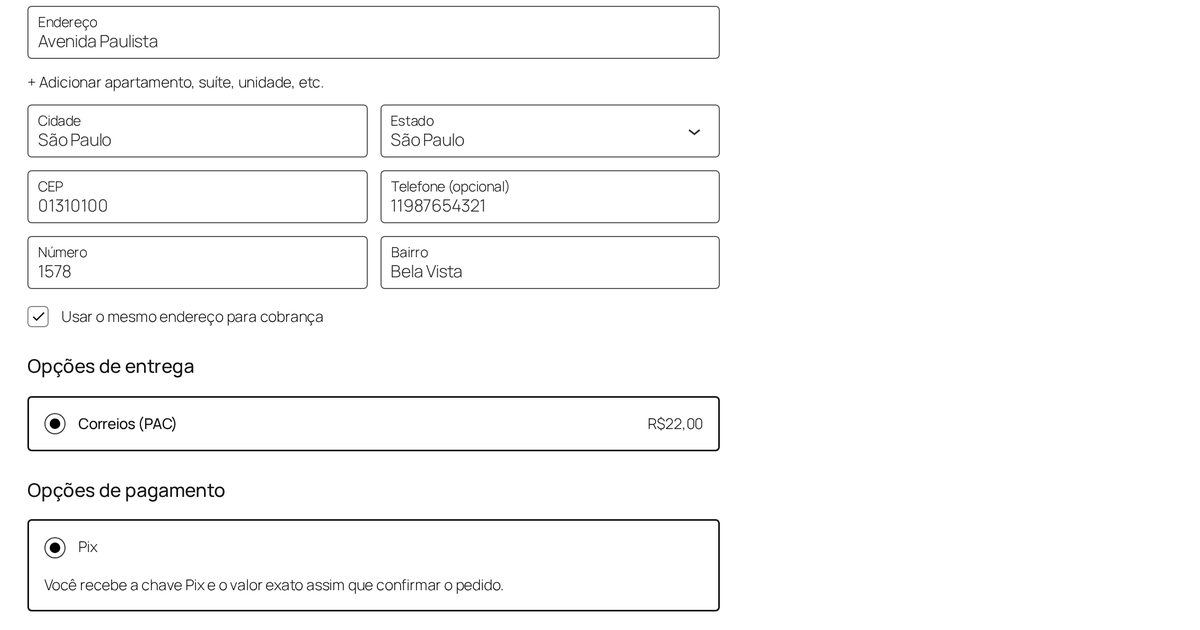
A buyer in Rio reaches your checkout. The store was set up in São Paulo, so the state dropdown already reads São Paulo. She types her CEP, the street and neighbourhood fill in from it, she pays, and her order ships to the wrong state at the wrong freight price. Nothing threw an error. She did everything right.
That one behaviour — a postal code that fills the address but does not correct the state — is the single most common way a WooCommerce store loses Brazilian orders quietly. It is worth understanding, because the fix for it is the same discipline that fixes most of what default WooCommerce gets wrong for Brazil.
What the default checkout is missing
WooCommerce ships an address locale for Brazil, but it is thin. Out of the box you get a checkout that:
- never asks for a CPF or CNPJ, so you cannot issue a nota fiscal and, for many products, cannot legally complete the sale;
- has no first-class número or bairro field — a Brazilian address without the house number and neighbourhood is not a deliverable address, and cramming them into "address line 2" is how packages get lost;
- makes the buyer type a full address that their CEP already knows, then trusts them to also fix the state the store pre-filled for them.
None of this is exotic. It is simply that WooCommerce's defaults were drawn for the United States, and a Brazilian buyer notices the seams immediately. A checkout that feels foreign is a checkout people abandon.
The bug worth internalising: autofill has to overwrite
Here is the trap, and it is a general one. When you fill an address from a CEP, the naive implementation writes into fields that are empty and leaves the rest alone. That sounds safe. It is not, because the state field is not empty — WooCommerce pre-selects the store's own state for you.
// Naive: only fills blanks. The state was never blank.
if (!stateField.value) stateField.value = lookup.uf;   // never runs

// Correct: the CEP is authoritative for the address it describes.
stateField.value = lookup.uf;                          // "RJ"
cityField.value  = lookup.localidade;
streetField.value = streetField.value || lookup.logradouro;
neighbourhood.value = neighbourhood.value || lookup.bairro;
The rule that falls out of it: the CEP is authoritative for city and state, and a hint for the street. Overwrite the fields the buyer cannot know better than the postal service (state, city), and only suggest the ones they might have typed already (street, number). Get that boundary right and the wrong-state bug, plus a dozen quieter ones, simply cannot happen.
The same logic applies to a company buyer. Look up a CNPJ and you can fill the razão social and the company's registered address — but if the person has already typed something, do not stomp on it. Autofill is a helpful assistant, not an authority on what the human meant.
Person or company, and the fields change
A real Brazilian checkout asks one question first: pessoa física or pessoa jurídica? The answer changes which document you collect and how you validate it.
- Pessoa física gives a CPF: eleven digits, its own mask, its own check-digit rule.
- Pessoa jurídica gives a CNPJ: fourteen digits, a different mask, a different check-digit rule, and usually a razão social to go with it.
Showing both at once, or validating a CNPJ with the CPF rule, is the kind of small wrongness that tells a buyer the store was not built for them. The document field should switch with the customer type, mask as they type, and reject a number that fails its check digits before the order is ever placed — not after, in a support email.
Doing the lookups without holding the sale hostage
Two free public services do the heavy lifting: ViaCEP turns a postal code into an address, and BrasilAPI turns a CNPJ into a company. Three details decide whether they help you or hurt you:
- Call them from your server, not the browser. A client-side fetch leaks the buyer's typing to a third party on every keystroke and breaks the moment the service adds a CORS rule. Proxy it.
- Cache the answers. A CEP maps to the same street today and next year. Every repeated lookup you make is latency you are adding to a checkout for no new information.
- Never let a lookup block the purchase. If ViaCEP is having a bad afternoon, the buyer types the address by hand and checks out anyway. An autofill that goes down must degrade to a plain form, not to a dead checkout.
That last point is the one people skip, and it is the one that costs money. A convenience feature that can stop a sale is not a convenience feature.
About Pix, honestly
Pix is how Brazil pays now — an instant bank transfer, cleared in seconds, that most buyers reach for before a card. Supporting it is table stakes.
What is worth being straight about is the shape of that support. A lightweight approach hands the buyer your Pix key and the exact amount the moment they confirm the order, and you reconcile the payment yourself. That is simple, it has no per-transaction cut, and it is honest about what it is: it does not automatically mark the order paid the instant the money lands. If you need hands-off reconciliation at volume, you want a full payment gateway with a Pix API, and you will pay its fees for the privilege. Neither is wrong. Knowing which one you are choosing is the point.
The short version
Selling into Brazil on WooCommerce is not a translation job. It is CPF and CNPJ collected and validated correctly, número and bairro treated as real fields, an address that fills itself from the CEP including the state, lookups that run server-side and never block the sale, and a payment method the buyer already trusts. Miss the state-overwrite detail alone and you will ship to the wrong place at the wrong price, and never hear why the order did not come back.
We packaged all of this — the person/company logic, the masks and check digits, the cached server-side ViaCEP and BrasilAPI lookups, and a Pix option that says exactly what it does — into a single plugin, Checkout Brasil. Every field can be turned off, made optional, or required; nothing is forced. If you would rather build it yourself, the sections above are the parts that actually matter.
We build and run small products, and write up what breaks. Checkout Brasil · Rebel Studios.