You turn on High-Performance order storage, go back to the Plugins page, and one of your plugins is now wearing this:
⚠ This plugin is incompatible with the enabled WooCommerce feature ‘High-Performance order storage’, it shouldn’t be activated.
That string lives in src/Internal/Features/FeaturesController.php, line 1933 of WooCommerce 11.3.1. It is worth knowing exactly what produces it, because it is not what most people assume.
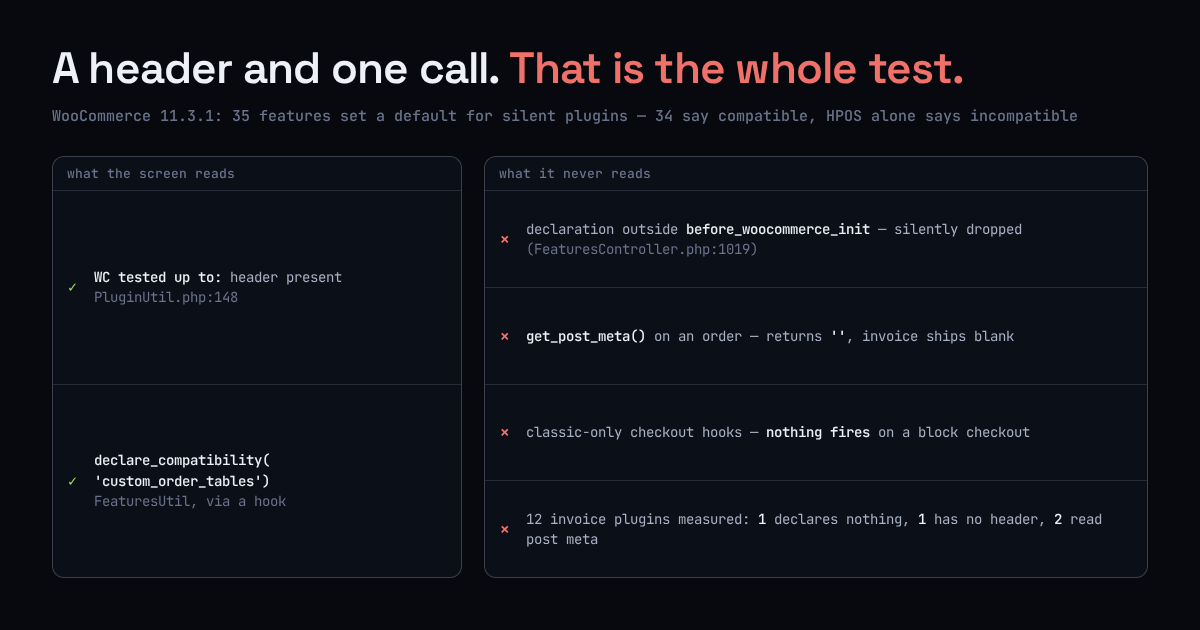
Thirty-five lines in WooCommerce 11.3.1’s src/ tree set default_plugin_compatibility — the answer the platform uses for a plugin that has said nothing either way. Thirty-four of them set it to compatible. One sets it to incompatible, and it is the one everybody has to deal with: HPOS, at src/Internal/DataStores/Orders/CustomOrdersTableController.php line 617.
So for HPOS, and for HPOS alone, silence is an accusation. A plugin that reads and writes orders entirely through the modern API, and would survive HPOS perfectly, gets branded because nobody added one line to it. That line is:
add_action( 'before_woocommerce_init', function () {
    if ( class_exists( \Automattic\WooCommerce\Utilities\FeaturesUtil::class ) ) {
        \Automattic\WooCommerce\Utilities\FeaturesUtil::declare_compatibility(
            'custom_order_tables', __FILE__, true
        );
    }
} );
Now the other direction, which is the one that will actually cost you an afternoon. WooCommerce only considers a plugin at all if it is “WooCommerce aware”, and the test for that is one plugin header:
return '' !== ( $plugin_file_or_data['WC tested up to'] ?? '' );src/Utilities/PluginUtil.php, line 148. No WC tested up to: header, no place in the list. A plugin can call get_post_meta() on every order id in your shop and it will never appear on that incompatibility screen, because it never filled in the header that would have got it looked at.
Both halves point the same way: the warning sorts plugins by what they said, and there is no step anywhere in there that tests what they do.
Three greps that test what they do
Unzip the plugin, or open wp-content/plugins/<plugin>/, and run these. Ten minutes for a plugin, and they are the same three questions a reviewer would ask.
1. Did it declare, and in the right place?
grep -rn "declare_compatibility" .You want 'custom_order_tables', and you want it inside a before_woocommerce_init handler. Anywhere else and the call is dropped: WooCommerce checks doing_action( 'before_woocommerce_init' ) and, if it is not, fires wc_doing_it_wrong and returns (FeaturesController.php lines 1019–1023, since WooCommerce 7.0). A declaration in the wrong hook looks exactly like a declaration in the right one, in the code and in your diff. It just does nothing.
2. Does it reach around the API to the posts table?
grep -rn -e "get_post_meta" -e "update_post_meta" \
         -e "wp_update_post" -e "'shop_order'" .
With HPOS authoritative and the compatibility-mode sync switched off, an order is rows in wp_wc_orders and wp_wc_orders_meta. What sits in wp_posts is a placeholder whose post type is shop_order_placehold (DataSynchronizer::PLACEHOLDER_ORDER_POST_TYPE). So get_post_meta( $order_id, '_billing_email', true ) does not error. It returns an empty string, and the plugin carries on with a blank where the customer used to be — which is why this failure shows up as a wrong invoice rather than a white screen. The replacements are wc_get_order(), $order->get_meta(), $order->update_meta_data() and wc_get_orders().
'shop_order' on its own is not a hit, though. This is the legitimate use, from our own invoice plugin’s includes/Orders.php:
$screen = wc_get_page_screen_id( 'shop-order' ); // HPOS-aware
add_meta_box( 'wcinv-documents', __( 'Invoices & Documents', '…' ),
    array( $this, 'render_metabox' ), array( 'shop_order', $screen ), 'side', 'default' );
wc_get_page_screen_id( 'shop-order' ) returns woocommerce_page_wc-orders when HPOS is on and shop_order when it is not (includes/admin/wc-admin-functions.php, line 76). Registering for both is how one metabox covers both order screens. Read the surrounding lines before you count a grep hit against anyone.
3. Does it only know the old checkout?
grep -rn -e "woocommerce_checkout_fields" \
         -e "woocommerce_checkout_process" \
         -e "woocommerce_after_checkout_validation" .
All three of those fire from includes/class-wc-checkout.php — the shortcode checkout. The Checkout block posts to the Store API instead, and the Store API does not run WC_Checkout::process_checkout(). A plugin whose entire checkout integration is those three hooks does nothing at all on a block checkout: no added field, no validation, no error. Nothing in the admin mentions it. The block-side equivalents are woocommerce_store_api_checkout_update_order_from_request (src/StoreApi/Utilities/CheckoutTrait.php, line 440) and the additional-checkout-fields API, woocommerce_register_additional_checkout_field (src/Blocks/Domain/Services/functions.php).
And to know which mode your own store is in, rather than guessing from the settings screen: get_option( 'woocommerce_custom_orders_table_enabled' ) === 'yes' is the exact test WooCommerce itself uses (CustomOrdersTableController.php, line 231). The sync toggle is the second setting under the same feature, and it is the thing quietly keeping some of these plugins alive.
What the greps find in the twelve biggest plugins in this category
Writing a recipe and not running it is how you end up with a recipe that doesn’t work. So I ran these three over the invoice and order-document plugins in WooCommerce’s own corner of the directory: the twelve that wp.org’s search for pdf invoice woocommerce returns as plugins whose job is order documents, from 300 active installs up to 300,000. Current release of each, downloaded from wordpress.org on 24 November 2026, vendor/ excluded.
- Eleven of the twelve declare
custom_order_tables, and all eleven do it from a file that hooksbefore_woocommerce_init. This is a well-looked-after category; the declaration has clearly made the rounds. - One of the twelve declares nothing, so on an HPOS store its users see the warning — whatever its code actually does.
- One of the twelve ships no
WC tested up to:header. It does declare compatibility, but without that header WooCommerce does not treat it as Woo-aware, so it cannot appear in the list either way. The screen has nothing to say about it. - Six of the twelve contain at least one live post-meta call with an order in the same line — fifteen lines between them. That is the raw grep count, and it is where the reading starts rather than ends. Of those fifteen: eleven sit in a file that explicitly tests whether HPOS is on, which is a deliberate legacy fallback and exactly what you want to find; two are my detector being wrong (one is example code inside an admin help-text file, one is a commented-out call sharing its line with live code); and two are plain reads in files that never mention HPOS — one of them also reaching for
$order->id, a property WooCommerce replaced in version 3.0.
Fifteen lines in; two survived reading. That is the point of the recipe: the grep finds the lines, you decide what they mean, and the deciding is the part that cannot be automated away.
I am not publishing a league table of which plugin is which. One admin-screen read is not the same as a broken invoice, I have not run any of these on an HPOS store, and a plugin author deserves the chance to answer before a number with their name on it goes up. The method is here, the plugins are one search away, and you can grep the ones you actually have installed — which is the only list that matters to your shop. The script I measured with is a page of Python and I will send it to anyone who asks.
The third grep I left out of the count. In this category almost nothing adds checkout fields, so “classic hooks only” measures nothing here; it is the check that matters for shipping, tax and checkout-field plugins, not invoice ones.
The part worth keeping
A compatibility declaration is a promise, and the platform has no way to test a promise. So it checks the two things it can see from outside: a header, and a one-line function call. Both are free to pass. Anything free to pass gets passed by everyone, including the plugins that should not — and gets skipped by careful plugins that nobody thought to nag. The screen is a filing cabinet, not a test suite. The greps are the test suite, and they take less time than reading the support thread.
What we don’t know
Twelve plugins in one category is not the directory, and it is not a random sample either — it is the top of one search on one day. The pattern-2 count comes from reading code, not from running it: I have not installed any of these on an HPOS store and watched an invoice come out wrong, so treat those two lines as questions, not defects. We also cannot tell you how long a pattern-2 plugin will keep working on your store: with sync on it can look fine for months and break on the day someone turns sync off. And the block-side hook names are not as settled as they look — CheckoutTrait.php carries deprecation shims for two earlier names of that one action, which is a reason to pin your own code to the current name deliberately rather than by copying a four-year-old snippet.
Our invoice plugin, since you are already in the directory
Rebel Studios Invoice Documents for WooCommerce is free, declares both custom_order_tables and cart_checkout_blocks in a before_woocommerce_init handler (rebel-studios-invoice-documents-woocommerce.php, lines 53–62), and reads orders through wc_get_order() and $order->get_meta() — the shipped 1.0.3 zip contains no get_post_meta call at all. Run grep 2 on it yourself; that is the point of writing the greps down. It is new: no installs and no reviews yet, and it does what the listing says and nothing more.
Every line number and file path above was read in WooCommerce 11.3.1, downloaded from wordpress.org on 24 November 2026. Line numbers move between releases; the file paths and the function names are the durable part.