I was auditing which of our own one-dollar utilities have no way in from a search engine, and one of them turns a flat PDF into a fillable form. Before writing a word about it I wanted the thing a reader needs to know first: how do you tell a fillable PDF from a flat one without opening it?
The advice you find is to look for /AcroForm. So I ran that over every PDF on this
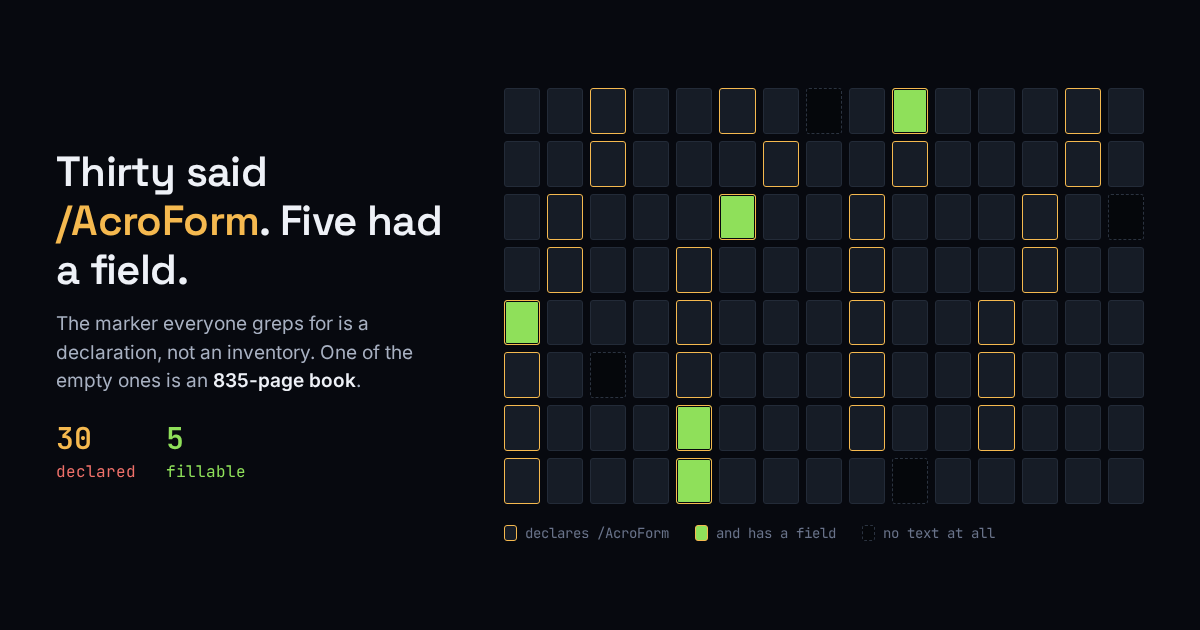
machine, 120 files, all of them parsed cleanly by pypdf 6.12.2. Thirty declare an
/AcroForm. Five contain a field. Twenty-five of those declarations are
empty, and the worst offender is an 835-page programming book.
What /AcroForm actually promises
Nothing you can type into. /AcroForm is one dictionary in the document catalog,
and the fields it would describe live in its /Fields array. A producer can write that
dictionary with the array empty or absent, and plenty of them do: export a book from a layout tool
and the /AcroForm can come along for free because the toolchain emits one.
pdfinfo, which is the proper tool rather than a grep, repeats the declaration
without checking it. On the 835-page book it prints Form: AcroForm. The book has no
fields. That line is a claim the file makes about itself.
The field count is the only honest test
Count the fields and the number stops lying:
python3 -c 'import pypdf,sys; print(len(pypdf.PdfReader(sys.argv[1]).get_fields() or {}))' form.pdf
Across the same 120 files that returns non-zero five times. The strings version of
the same idea, grepping the raw bytes for /Widget, the annotation that carries one
field, found only four of the five. The one it missed keeps its form inside a
compressed object stream, where the name never appears as plain text anywhere in the file. A grep
over PDF bytes is a lower bound, not a count. It was wrong a second way about the one genuinely
fillable form in the set, a two-page salvage-title application: zero raw-byte hits for
/XFA, while pdfinfo reads the same file and reports
Form: XFA correctly.
The case no tool can fix
Four of the 120 return zero characters of extractable text. They are pictures of pages. This is the case worth knowing before you pay anybody, because every blank-detecting tool, ours included, works by reading the text and finding where the blanks are. With no text there is nothing to find. One command settles it:
pdftotext form.pdf - | tr -d '[:space:]' | wc -c
If that prints a number near zero, no field detector can help you yet. Put the file through OCR first, then try again.
Three outcomes
| Field count | Text characters | What you have |
|---|---|---|
| > 0 | any | Already fillable. Open it and type. If it shows a “please wait” placeholder forever, it is an XFA form and wants Adobe. |
| 0 | about 0 | A scan. OCR it before any tool can see a blank. |
| 0 | plenty | A flat text form. The only case where blank detection has anything to work with. |
Two commands, run before you pay anyone, us included.
The one-dollar shortcut
For that third row we built PDF → fillable: upload the flat form, pay $1 by card, get back a PDF with real interactive fields. No account, and we keep no copy of either file. Two limits worth stating plainly: it refuses scanned PDFs, for the reason above, and to locate the blanks it sends the first 12,000 characters of the document’s text to OpenRouter, an outside AI service. Upload the blank form, not one you have already filled in. The same endpoint answers AI agents over HTTP 402.
What I don’t know
This is one disk, and a programmer’s disk: the 25 empty declarations are mostly technical
ebooks, so treat thirty-and-five as the shape of the problem rather than a rate to expect on
yours. get_fields() reads the AcroForm field tree, so a pure XFA form with no
AcroForm fallback could in principle count zero while still being fillable in Adobe; every form
here had both. And none of this tells you whether the fields a file does have sit in the right
places. That takes opening it.