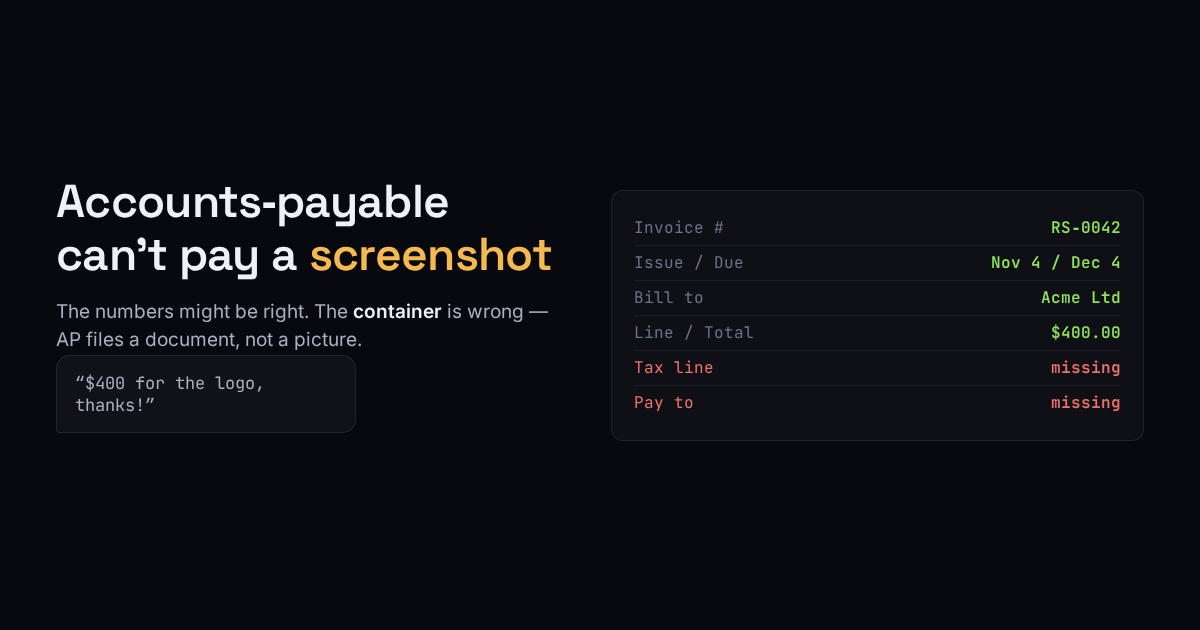
A freelancer sends “$400 for the logo, thanks!” in an email, or a photo of a hand-written note, or a figure typed into a chat. From their side the invoice is done. From the customer’s side nothing has arrived that can be paid, because the person who pays it is rarely the person who hired you.
At any company past a certain size, your message lands with accounts-payable, and AP does not read prose. They file a document against a purchase, and to do that the document has to carry a specific set of fields. Miss one and the invoice does not get rejected with an explanation — it gets set aside, and “set aside” is indistinguishable from “unpaid” until you chase it.
What a payable invoice actually has to say
None of this is decoration. Each field answers a question AP has to answer before it can release money:
- A unique invoice number — so it can be referenced, matched to a payment, and not paid twice. “Invoice” with no number is the single most common reason one stalls.
- Issue date and due date — the due date sets the clock; without it “net 30” starts whenever they feel like it.
- Who is billing and who is billed — your legal name and theirs, not a first name and a vibe.
- Line items with quantities and a total — the total has to equal the lines, because AP will check, and a total that does not add up is a hold.
- Tax, stated separately — a VAT or sales-tax line is a legal requirement in many places, and a lump sum with tax buried inside is not claimable.
- How to pay — bank details, terms, accepted methods. An invoice with no payment instructions asks the payer to come find you.
A screenshot can hold every one of these values and still be useless, because it is a picture: it cannot be searched, the total cannot be verified against the lines, and it will not file. The content might be right. The container is wrong.
Reformatting is the fast fix
If you already have the figures — in an email, a photo, a rough draft — the work left is arranging them into that structure and rendering a real PDF. That is what our $1 invoice tool does: you give it the rough version, it lays out the fields a payer expects and returns a clean, professional PDF you can send. It is for the person who has the numbers and does not want to fight a word processor into a layout.
What a layout cannot do for you
Here is the honest edge of it. Reformatting arranges what you provide; it does not invent what you left out. If you do not have a tax registration number, no tool can print a valid one — and if your buyer needs a VAT invoice, that number has to be real and yours. If your country requires sequential invoice numbering with no gaps, a one-off generated number will not satisfy an audit; that is a job for a system that keeps a register, which is a different product than a one-shot formatter.
So the rule is simple. A clean PDF fixes the container problem, which is most of why invoices stall: it turns a screenshot into a document AP can file. It does not fix a content problem — a missing tax number, a total that was wrong to begin with, a legal-numbering requirement. Get the figures right, then make them payable. In that order the $1 version is genuinely all most people need.