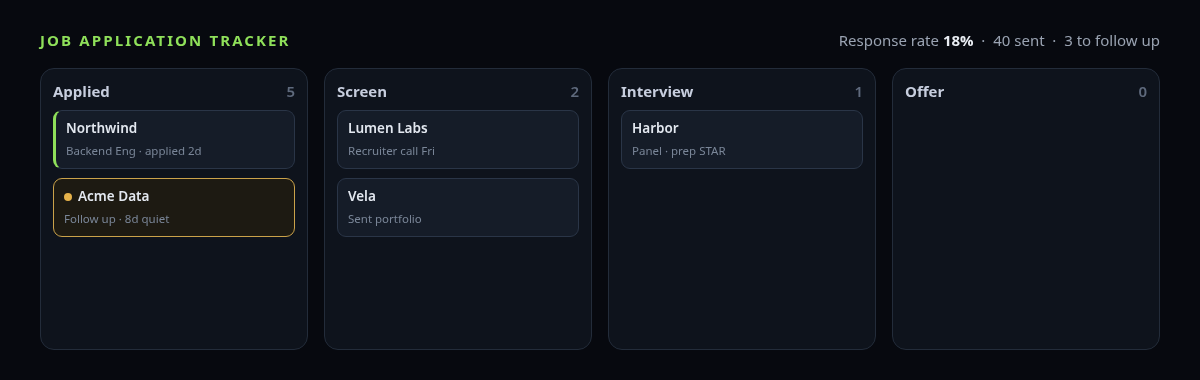
The first ten applications you can hold in your head. You know who you heard back from, who you’re still waiting on, and which one you actually want. Somewhere around thirty, that stops being true. You re-apply to a company you already applied to. A recruiter replies “remind me which role?” and you can’t. A posting you were perfect for goes cold because you never followed up, and by the time you notice, the window has closed.
None of that is a discipline problem. It’s a memory problem, and the fix is to stop keeping it in your memory. A tracker doesn’t make you a better applicant; it makes the pile legible so you can see where to spend the next hour.
What the tracker has to hold
The temptation is to build something elaborate. Resist it: the tracker you keep updated is the one that asks for almost nothing. Six fields carry the whole job hunt.
- Company and role. One row per application. This alone kills the duplicate-application problem.
- Date applied. Everything else is measured from here — how long you’ve waited, whether a follow-up is due.
- Where you found it (LinkedIn, a referral, the company site). After a month this tells you which source actually produces replies, and which is a time sink.
- Status. A short, fixed list: Applied → Screen → Interview → Offer, plus Rejected and Closed. Not a free-text note — a value you can count.
- Next action, and when. “Follow up 25th,” “send portfolio,” “prep for panel.” The single most useful cell in the sheet.
- The posting’s keywords. The specific tools and titles it asked for, so the resume you send matches the words it will be scored against.
That is the whole spine. Salary, contact name, and a link to the posting are worth adding when you have them, but they’re optional. If a column doesn’t change a decision you’ll make — who to chase today, what to send — it’s decoration, and decoration is what makes a tracker rot.
The follow-up window is the point
A polite follow-up roughly a week after applying, or a few days after an interview, measurably moves things — not because it charms anyone, but because it puts you back on top of a busy person’s pile at the moment they’re deciding. The problem is never knowing that; it’s noticing which of forty applications crossed the line today.
So the rule that earns its place is simple: an application that’s been Applied with no movement for about seven days should flag itself. You don’t want to set a reminder per application — that’s the manual work you’re trying to escape. You want the sheet to compare today’s date against the date applied and raise its hand on its own. Open it in the morning, see three rows flagged, send three notes, done.
Response rate tells you where the problem is
Once statuses are values instead of vibes, one number falls out of them: of everything you sent, what share got any human reply? That figure is diagnostic.
If it’s very low across dozens of applications, the problem is upstream of the interview — the resume isn’t clearing the first filter, or you’re aiming at roles that don’t fit. Fix the resume and the targeting; sending more of the same is just faster failure. If you’re getting replies but stalling at the screen, the problem moved downstream, and more applications won’t help. Without the count you can’t tell those two apart, and they need opposite responses.
A sheet that already does this
If you’d rather not build the formulas, the Job Hunt Tracker is a Google Sheets and Excel workspace with exactly this spine: a dashboard that counts your pipeline and response rate, a follow-up flag that trips when an application goes quiet for a week, and a per-posting keyword tab. It’s $12 once, it’s a file you own, and there’s no account or subscription. Pairs with the free Resume Keyword Matcher browser extension.
Keep the keywords next to the application
Most applications now pass through an applicant tracking system that scores your resume against the posting’s exact terms before a person sees it. The practical consequence for your tracker: the keywords aren’t a separate exercise, they belong in the same row as the application. When you paste a posting’s must-have tools and titles beside it, tailoring the resume becomes a two-minute diff instead of a rewrite — you can see at a glance which terms are already on your resume and which are missing for this job.
Spreadsheet or a dedicated app?
Be honest about this rather than sell you the sheet. A purpose-built job-search app like Huntr or Teal does things a spreadsheet can’t: a browser extension that captures a posting in one click, autofilled company details, reminders that push to your phone, and shared boards if you’re job-hunting with a coach. If that autocapture is what keeps you consistent, it’s worth the monthly fee, and you should use it.
A spreadsheet wins on the things those trade away. It’s a one-time cost or free, not a subscription you’ll forget to cancel after you’re hired. Your data sits in a file you control, not on someone’s server. It works offline, it exports to anything, and you can bend it to your own hunt without waiting on a feature request. For most people running a normal search, the sheet is enough — and “enough, and I’ll actually keep it open” beats “powerful, and I stopped logging in after a week.”
Common questions
How many columns should a job tracker have?
Fewer than you think. Company, role, date applied, source, status, and next-action cover the whole hunt; a keyword field makes tailoring faster. Every column past that has to earn its place by changing a decision, or it just makes the sheet feel like a chore.
When should I follow up after applying?
About a week after applying if you’ve heard nothing, and within a few days after an interview. The hard part isn’t the timing, it’s spotting which applications hit that mark today — which is exactly what an automatic follow-up flag is for.
Is a spreadsheet good enough, or do I need an app?
For a normal search, a spreadsheet is enough and you’ll keep it updated because it asks nothing of you. Choose a dedicated app when one-click capture from job boards or phone reminders are what keep you consistent.
Where to start
Open a sheet, make the six columns, and put every open application in it before you send another one. That single act — getting the pile out of your head and onto one screen you can sort — is most of the benefit. If you want the dashboard, the follow-up flag, and the keyword tab already built, the Job Hunt Tracker is $12 and yours to keep.